Sunday, May 17

Indian Men's Biggest Fears...

What is an Indian guy’s biggest fear? I have found this after a thorough research on myself and also a few other guys I’ve met. Let’s take a countdown to all these one by one:

10. Getting caught while drinking / smoking


To many men (non-IT), drinking still remains a taboo. And now, after a ban being imposed on liquor in India, I guess this will be eased out a bit. Many times, men fear getting caught by girlfriend / parents, while drinking / smoking. When I used to smoke and drink, I myself was many times caught by this fear. It’s really a pain.

9. Free falling


This generally happens to acrophobic people: those who are afraid of height. Some people also avoid taking the elevators, just because of the fear that the wire might trip.

8. Small children and babies


I am pretty good with young kids, but I found many people so much afraid of their own li’l ones. This is weird, but true. Most of the guys simply avoid getting married just due to this untold reality. They say, “I love everything about marriage, excepting the ‘kid’ factor.” I feel this is not that a dreadful fear, but should be avoided.

7. Large insects


Yes, I used to have this fear when I was a kid. Large insects in the most weirdest of nightmares.

6. Meeting girlfriend’s parents


What can I say about this? This is indeed one of the greatest fears for all of us. The fear that one wrong answer, and everything will be finished. In the process, we also start predicting what will be the next question, and frame answers for that; but when the next question happens to be something else, we get tensed even more.

5. Being rejected when asking a girl on a date


More than a fear, I feel, this is an insult. An insult to one’s emotions, skills and judgment.

4. Losing job


Joblessness is one of the biggest fears for any Indian. This has propped up very recently, following the Global Economic Meltdown. That’s why, most of us, no matter how worse their present job is, are thriving in the present situations in their workplaces.

3. Hair Loss / Ageing


Again, most think that men don’t care about their looks and appearance. But, frankly, that’s not right. Although, we are surely not that self conscious about our looks n all, but we do fear losing our hair and looks, post a particular threshold, and become restless.

2. Proposing to girlfriend


This happens to be the most dreaded fear among most of us, and may very well qualify to be the No.1 in the most dreadful men’s fears. Most people end up in a break-up just because they were unsure of the right time, and were afraid of losing their girlfriend.

1. Relegation of the Indian Cricket Team / player(s)
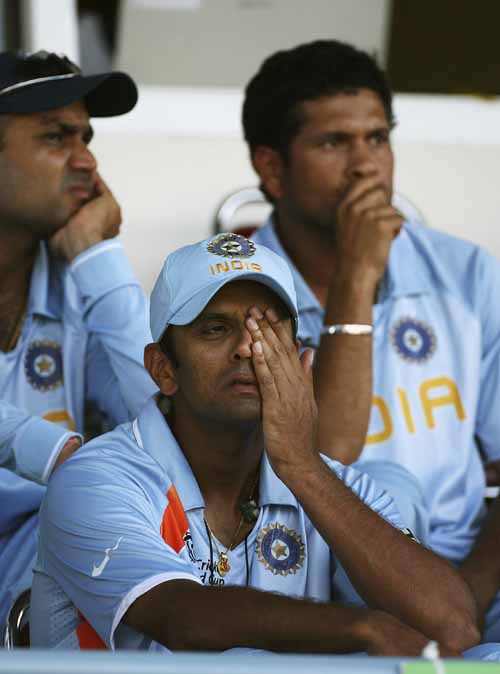

This is the most common fear of most of Indian guys. If I take a poll, this might just lose out to the point no.2, but believe me, there are so many emotions surrounding the Indian cricket team and its players. May it be the national team or our domestic teams; we are just too much reluctant to let it go to hell. Some cricket frenzies even dream of cricket every night! Weird! Most facts happen to be weird!

Customer Care Blues...

Customer Support guys are known to be a boon to today’s world. But, there are instances when we feel, we would have been better off without them. Here are a few such instances:


Instance 1

I had trouble downloading an operating system upgrade for a PDA, so I called tech support.

  • Me: “I can’t seem to get this download to complete. What might be causing it?”
  • Tech Support: “What operating system are you running?”
  • Me: “Windows NT.”
  • Tech Support: “Well, you have to be running Windows 98 or better in order to download it.”
  • Me: “Ummm, I am. I’m running Windows NT4, SP5.”
  • Tech Support: “Are you on a PC or a MAC?”

Instance 2

My school required me to do some of our reports on laptops and print from a single printer. After a few months the laptop they provided me ceased to work with the printer. I spoke with the IT Manager.

  • IT Manager: “I don’t know if the problem is a hardware problem or a software problem.”
  • Me: “Ok.”
  • IT Manager: “So I can’t solve the problem now.”
  • Me: “When can you solve it?”
  • IT Manager: “I told you: I don’t know if it is a hardware problem or a software problem. I can’t fix it until I know.”
  • Me: “Ok. I need to print my reports. When will I be able to?”
  • IT Manager: (angrily) “Look, if it’s a hardware problem I can’t fix it! I don’t know if it is a hardware or a software problem.”

I made several more attempts to communicate with the IT manager about this problem over the next few weeks, only to find myself in the same conversation. Finally, I sent a memo to my boss, explaining that I was having difficulty getting tech support and could not print out my reports. My boss wrote back:

  • Boss: “Please do not harass the IT Manager anymore. He has already explained to you that he doesn’t know whether it is a software problem or a hardware problem.”

Instance 3

There’s this quite major company called Hewlett Packard over here in India. I bought a system from them, and then five months later I hear a “Pfoo!” noise, and my display went all fuzzy and strange.

Here’s the conversation I had with tech support about it, with a lot cut out:

  • Tech Suppport: “What seems to be the problem, sir?”
  • Me: “Well, my screens all fuzzy, and my video card seems to have exploded.”
  • Tech Support: “Well, right click on the desktop.”
  • Me: “Before you say anything, I’ve tried the monitor on another computer, and on this computer on Windows 98, 2000, Linux, and BeOS, and it’s definitely something wrong with the video card, because the monitor worked on the other computers, and it didn’t work in any of the operating systems in this one, and when I tried another video card, it worked.”
  • Tech Support: “Right click on the desktop.”
  • Me: “…”
  • Tech Support: “Right click on the desktop.”
  • Me: “Well, I’m in Linux right now.”
  • Tech Support: “Right click on the desktop.”
  • Me: “I’m not in Windows.”
  • Tech Support: “Right click on the desktop.”
  • Me: “Do you know what an operating system is?”
  • Tech Support: “Yes, sir.”
  • Me: “Ok then, because, I’m not in Windows. I’m in Linux, which is another operating system. Right clicking on the desktop won’t do anything you think it will, I promise. Do you want me to reboot into Windows?”
  • Tech Support: “Right click on the desktop please, sir.”

I sighed, gave up, rebooted into Windows, and right clicked on the desktop.

  • Me: “Do you want me to click on ‘Properties’?”
  • Tech Support: “No sir, please click on ‘Properties’.”
  • Me: “…”

After a while, “we” determined that, no, it isn’t my resolution, and installing new drivers won’t help. After a very long discussion, I learned that to replace my video card, they would “have to” (or so policy dictates) take the entire computer away (monitor and all) for 5-7 business days to replace the faulty video card. I protested this, because the computer was being used in a business. They told me there was “nothing they could do.” This seemed bad enough, but then:

  • Tech Support: “Have you backed up recently?”
  • Me: “No, why?”
  • Tech Support: “You should…”
  • Me: “Sure, ok, I’ll remember.”
  • Tech Support: “…because as part of our policy, when servicing a computer, we delete everything on the hard disk.”
  • Me: “What the $%* *%(@ $%? WHY???”
  • Tech Support: “Company policy.”
  • Me: “But it’s a broken video card! Even you admit that!!! It has nothing to do with the hard drive!”
  • Tech Support: “That’s company policy, sir.”

After about an hour of arguing, we didn’t get anywhere. I am living with the video card up to this day, months later, and was not refunded in anyway.

Turns out to be rather more tragic than funny, actually.

Thursday, May 7

All about Malwares

Malware, a short for malicious software, is a software designed to infiltrate or damage a computer system without the owner’s informed consent. The expression is a general term used by computer professionals to mean a variety of forms of hostile, intrusive, or annoying software or program code.

Many computer users are unfamiliar with the term, and often use “computer virus” for all types of malware, including true viruses. Software is considered malware based on the perceived intent of the creator rather than any particular features. Malware includes computer viruses, worms, trojan horses, most rootkits, spyware, dishonest adware, crimeware and other malicious and unwanted software.

In law, malware is sometimes known as a computer contaminant, for instance in the legal codes of several American states, including California and West Virginia. Malware is not the same as defective software, that is, software which has a legitimate purpose but contains harmful bugs. Preliminary results from Symantec sensors published in 2008 suggested that “the release rate of malicious code and other unwanted programs may be exceeding that of legitimate software applications.”

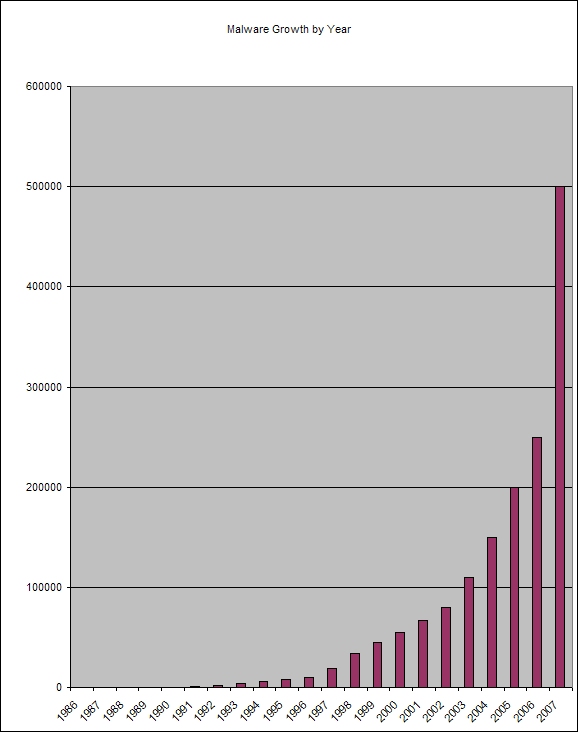
According to F-Secure, “As much malware (was) produced in 2007 as in the previous 20 years altogether.”

What is its purpose?

Many early infectious programs, including the first Internet Worm and a number of MS-DOS viruses, were written as experiments or pranks generally intended to be harmless or merely annoying rather than to cause serious damage to computers. In some cases the perpetrator did not realize how much harm their creations could do. Young programmers learning about viruses and the techniques used to write them only to prove that they could or to see how far it could spread.

As late as 1999, widespread viruses such as the Melissa virus appear to have been written chiefly as pranks.

Hostile intent related to vandalism can be found in programs designed to cause harm or data loss. Many DOS viruses, and the Windows ExploreZip worm, were designed to destroy files on a hard disk, or to corrupt the file system by writing junk data. Network-borne worms such as the 2001 Code Red worm or the Ramen worm fall into the same category. Designed to vandalize web pages, these worms may seem like the online equivalent to graffiti tagging, with the author’s alias or affinity group appearing everywhere the worm goes. However, since the rise of widespread broadband Internet access, malicious software has come to be designed for a profit motive, either more or less legal (forced advertising) or criminal.

Another strictly for-profit category of malware has emerged in spyware — programs designed to monitor users’ web browsing, display unsolicited advertisements, or redirect affiliate marketing revenues to the spyware creator. Spyware programs do not spread like viruses; they are generally installed by exploiting security holes or are packaged with user-installed software, such as peer-to-peer applications. It is not uncommon for spyware and advertising programs to install so many processes that the infected machine becomes unusable, defeating the intention of the attack.

The best-known types of malware, viruses and worms, are known for the manner in which they spread, rather than any other particular behavior. The term computer virus is used for a program which has infected some executable software and which causes that software, when run, to spread the virus to other executable software. Viruses may also contain a payload which performs other actions, often malicious. A worm, on the other hand, is a program which actively transmits itself over a network to infect other computers. It too may carry a payload. These definitions lead to the observation that a virus requires user intervention to spread, whereas a worm spreads automatically.

Some writers in the trade and popular press appear to misunderstand this distinction, and use the terms interchangeably.

How to counter such attacks?

As malware attacks become more frequent, attention has begun to shift from viruses and spyware protection, to malware protection, and programs have been developed to specifically combat them.

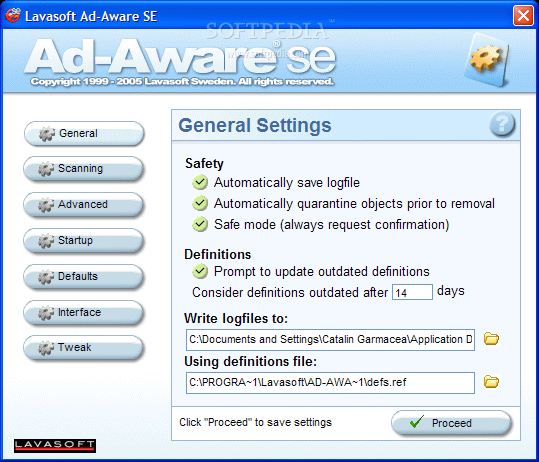
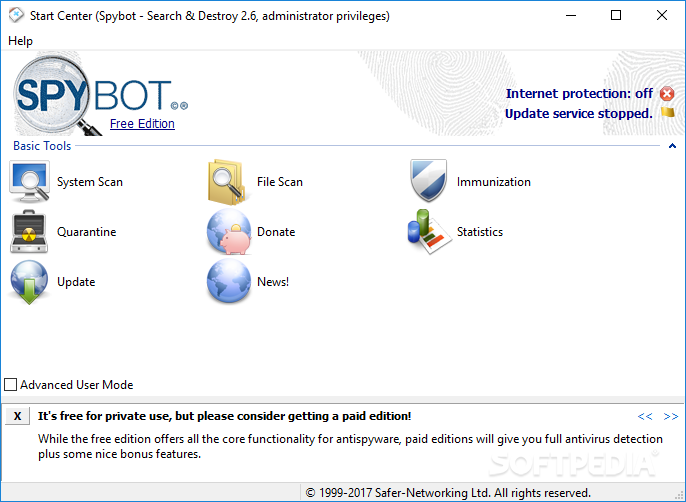
Lavasoft’s Ad-Aware SE and “Spybot - Search & Destroy” are examples of freeware program originally created to combat spyware and adware, but which also protects against some malware, viruses, and worms. Malwarebytes’ Anti-Malware is a shareware more focused on trojans, browser hijackers, and other malware, and which consequently roots out many kinds of malware that most other defensive programs won’t find. Anti-malware programs can combat malware in two ways:

1. They can provide real time protection against the installation of malware software on your computer. This type of spyware protection works the same way as that of anti-virus protection in that the anti-malware software scans all incoming network data for malware software and blocks any threats it comes across.

2. Anti-malware software programs can be used solely for detection and removal of malware software that has already been installed onto your computer. This type of malware protection is normally much easier to use and more popular. This type of anti-malware software scans the contents of the windows registry, operating system files, and installed programs on your computer and will provide a list of any threats found, allowing you to choose what you want to delete and what you want to keep, or compare this list to a list of known malware components, removing files which match.

Real-time protection from malware works identically to real-time anti-virus protection: the software scans disk files at download time, and blocks the activity of components known to represent malware.